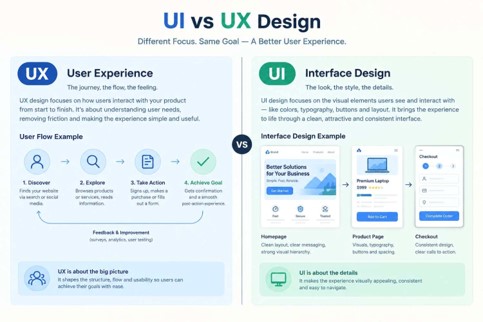
UI design is about how a digital product looks and feels, whereas UX focuses on how the user feels about it and how it works. Through good UI UX design in Dubai, both areas can come together so that visitors can understand a website, comfortably navigate it, and complete important functions without any hindrance. It matters for professional web design where you need to understand the difference between user interface UI and user experience UX because it helps in developing an ideal website structure, usability, content, and visual design.
What is user experience
User experience (UX) is the overall experience the visitor receives when they land on a website, web app, or digital product. UX design is crafted according to the following questions:
- Who is using the website?
- What are they trying to accomplish?
- What information do they need?
- How should pages or screens be organized?
- Where might users become confused?
- How many steps are required to complete an important task?
- What happens when something goes wrong?
Hence, user experience is way beyond an attractive visual appearance. It covers the experience from a person visiting the website to completing their required task.
What is the job of a UX designer
A user experience designer in Dubai may work in the following areas of web design:
- User research
- Information architecture
- User journeys
- User flows
- Wireframes
- Prototypes
- Interaction design
- Usability testing
- Content organization
- Navigation
- Form and checkout flows
For example, a clinic in Dubai may require the following things to be found efficiently by its patients:
- Available medical services
- Doctor information
- Location and parking details
- Insurance information
- Appointment availability
- A simple booking method
By designing a special user experience (UX), visitors can find this information without stress.
What is UI design
It is short for user interface and relates to the visual and interactive elements presented on the digital product. UI design includes the following:
- Typography
- Colours
- Buttons
- Icons
- Forms
- Spacing
- Images
- Navigation elements
- Cards
- Menus
- Input fields
- Visual hierarchy
- Hover, active, disabled, and error states
UI is not just about the visual appeal of an online presence but must make the underlying experience easier to understand. For example, a booking button might need to be visually prominent because booking is an important action. A secondary link may use a less prominent treatment so it does not compete with the primary action.
UI design helps to achieve visual consistency and helps visitors to learn what they can do on each screen.
What is the difference between UI and UX design
In simple words, UX is the overall experience the user gets when they land on the digital platform, while UI presents how that experience can be seen and interacted with. The following table shows prominent differences both have in between the two:
| UX Design | UI Design |
| Focuses on the overall user experience | Focuses on the interface |
| Defines structure and user flows | Defines visual presentation |
| Considers user needs and behaviour | Considers visual clarity and consistency |
| Includes wireframes and prototypes | Includes high-fidelity interface designs |
| Addresses usability problems | Communicates hierarchy through visual design |
| Asks “Does this work for the user?” | Asks “Is this clear and easy to interact with?” |
A practical example of the difference between UI and UX design
Visitors want to reserve a table online in a Dubai-based restaurant.
H3: The UX design plan involves
- Reservations should be accessible from the main navigation.
- Users should select date, time, and number of guests.
- The booking form should request only necessary information.
- Confirmation should be clear after submission.
- Contact and location information should be easy to find.
The UI design plan involves
- Where the reservation button appears.
- How the booking form is styled.
- Which fields are visually grouped.
- How selected dates and times are displayed.
- How errors are communicated.
- How the interface adapts to mobile screens.
Therefore, it can be evaluated that UX develops the experience of the digital platform, whereas UI focuses on communicating and presenting that experience visually. Both are needed for an effective and high-performing digital platform. Explore more on our Website Design Tips.
Why do UI and UX design matter
A simply visually attractive website is not enough. A website needs to convey what the business does, the relevant information about it, navigation must be strong between the pages, and completing suitable actions must be easier for the visitors. It is the stage where both become important.
Enhanced website usability
Website usability is deeply rooted in UX. A website is usable when visitors can understand and complete the task easily. For example, users will leave the site and won’t return if they find unnecessarily long forms. On the other hand, if important information is hard to find and navigation is unclear, they will move towards the competitors. User experience helps identify these problems before they become expensive issues later.
Clearer navigation
Users should not have to guess about the required information when they land on your website. A professional web design consists of elements and navigation set around users’ expectations more than the company’s internal strategies. For example, a service business must clearly separate the following information:
- Services
- Industries
- About
- Portfolio
- Resources
- Contact
Meanwhile, the exact structure and information are presented according to the business and audience.
Strong mobile experience
It is not necessary that a website performing well on a desktop can function well on a smartphone. The designer needs to check UX and UI according to:
- Smaller screens
- Touch interaction
- Readable text
- Button sizes
- Simplified navigation
- Form usability
- Image placement
- Page hierarchy
It is an important consideration for audiences who frequently use smartphones to access any business.
More consistent brand experience
With the help of UI design, you can create a consistent display that can be seen throughout the website. Instead of designing every button, heading, card, and form differently, a design system can establish consistent rules for:
- Typography
- Colours
- Buttons
- Forms
- Spacing
- Icons
- Components
Consistency in design can establish a coherent and understandable interface for visitors.
Additional important UI UX design elements for Dubai websites
There is much more in UI UX design when it comes to Dubai business websites, as they serve larger UAE audiences.
Bilingual interfaces
Businesses that serve bilingual audiences may need both English and Arabic versions of the website. For the Arabic version, a special right-to-left layout must be designed. RTL is not about moving the content structure to the right side of the page, but also checking the navigation, alignment, icons, forms, spacing, and interaction patterns as part of the RTL experience.
(https://localization.saudisoft.com/rtl-design/)
Multiple user needs
Dubai websites have to serve audiences with different cultures, languages, expectations, technical familiarity, and purposes. For example, a real estate website may serve:
- Property buyers
- Tenants
- Investors
- Property owners
- International visitors
Each of them might need different information and pathways. UX planning can help determine which information should be prioritised.
Mobile and other device experiences
Once a user has searched your website on mobile, they might return to it from a desktop screen. For consistent experiences, having responsive design can help your website adapt to any screen size without changing the underlying experience. Check out our page on the Responsive Web Design Guide.
How UX and UI work together
UX and UI are mostly developed together rather than crafted separately. For example, a typical process might include:
- Understand the users: you have to identify the business objectives, its target audience, its current issues, and important user tasks.
- Plan the information architecture: Organize pages, content, navigation, and relationships between different parts of the website.
- Identify user workflows: Make the steps easier for important tasks such as booking an appointment, requesting a quote, purchasing a product, or submitting an enquiry.
- Craft wireframes: Wireframes develop page structure without wasting time on visual design.
- Build a prototype: A clickable prototype can demonstrate how users move between screens or pages before development begins.
- Craft the UI: Visual design is created by designing typography, colours, components, imagery, spacing, and interaction states.
- Test and polish: Testing can display confusing navigation, unclear labels, difficult forms, or other usability problems.
Which one does your digital platform need: UI or UX?
Both are necessary for a well-developed and high-performing, professional website. Without UX, a website can be visually appealing through UI but can’t perform well due to a lack of underlying functionality. On the other hand, without UI, you can develop a good functional website with UX, but the lack of visual appearance can make things unclear. That’s why both need each other to balance the website’s ideal functioning. The appropriate balance can depend on the project type and size, as it is shown in the table below:
| Project Type | UX Considerations | UI Considerations |
| Business website | Navigation, content hierarchy, enquiry journey. | Branding, typography, calls to action. |
| E-commerce website | Product discovery, filters, checkout flow. | Product cards, buttons, forms. |
| Hotel website | Room discovery, booking journey, location information | Photography, room presentation, booking interface |
| Healthcare website | Services, doctor discovery, appointment flow | Trust-oriented visual hierarchy, forms |
| SaaS application | Workflows, dashboards, task completion | Data presentation, controls, component system |
| Mobile app | User journeys, gestures, navigation | Touch controls, screen layouts, interaction states |
What are the common UI UX mistakes you should avoid
- Start designing before understanding the user behaviour.
- Considering mobile-first design afterwards.
- Making every element prominent will confuse users to find the actual information.
- Using visually appealing design without testing.
- Ignoring accessibility.
FAQS:
- Is user experience more important than user interface?
A website usually benefits when both work together. User experience determines the feel that users will get with professional usability. UI works for visual appeal and interaction with the website.
- Can a website have a good UI but poor UX?
Yes, it can happen. A website can have a good visual appeal, such as attractive buttons, typography, images, and animations, but might have confusing navigation and an inefficient user journey.
- Is UI UX only for mobile apps?
No, it is for all types of digital products.
- What is the difference between UX and website usability?
Usability refers to how conveniently users can complete the required task and is part of UX. UX is a deep experience of interacting with services, products, or a company.
- Does UI UX design affect SEO?
They can’t replace SEO or quality content. But they support SEO through clear information architecture, usable navigation, mobile-friendly design, accessible content, and a good page experience so that people can easily use the website.
Conclusion
UI and UX are different from each other, but together they form a strong foundation of web design. Their combination helps the audience to understand the website and use it effectively. For UAE businesses, understanding of UI UX design is important so that they not only focus on the visual appeal but also on technical aspects. If UI UX design in Dubai is considered as one element from the beginning, the website gets a clearer, more usable, and more professional digital experience.